Kukirin Life upgrades: Faster Scooters and Cash Tips
Plan your Kukirin Life upgrades with scooter, motor, and battery tips. Learn how to earn Cash, use crates, redeem codes, and prioritize your next purchase.
Jump to
How Kukirin Life upgrades work
Your free G2 is a starting point, and there are several ways to move beyond it. Kukirin Life upgrades matter because faster scooters, hardware changes, and customization give you different goals for the Cash you earn. Planning your Kukirin Life upgrades starts with separating scooter purchases, battery and motor upgrades, and cosmetic changes before spending.
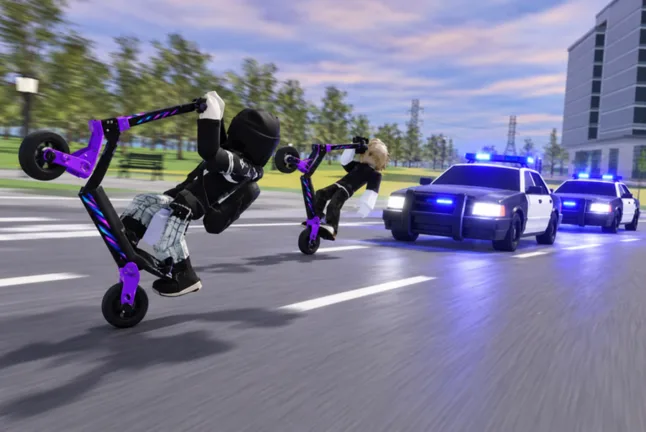
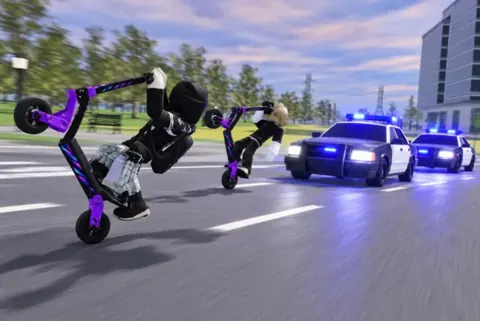
Kukirin Life [Testing] is a Roblox scooter simulation by Mukbang Lovers. Its driving, tricks, quests, and police chases feed into a loop: ride, earn Cash, and explore options for improving or personalizing your scooter.
However, an orange glow and a different motor serve different purposes. A good approach is to decide whether your next purchase should change your ride or its appearance.
| Upgrade category | Available options described in the game | What to check |
|---|---|---|
| Scooters | Free G2, G4, and G4 Ultra | The dealership’s current selection and purchase requirements |
| Hardware | Batteries and motors connected to crates | The parts you have available in the tuning shop |
| Appearance | Colors, wheels, decals, and lighting | Whether the option uses Cash or Robux |
| Accessories | Wheelie bar and other customization | The displayed item details before purchasing |
The G4 is described as a faster scooter option, while the G4 Ultra is identified as the fastest model in the gameplay guide. Treat that ranking as an observation about the demonstrated version: the experience is still in testing, and its scooter lineup can change.
There are no supported top-speed figures or detailed battery and motor statistics here. Avoid choosing an upgrade based on an assumed speed increase, range bonus, or handling improvement.
For a useful starting routine, inspect the dealership and tuning shop before committing your earnings. That lets you compare actual options rather than buying something because its name sounds powerful.
Official source: Kukirin Life (roblox.com)
Claim free Cash and a crate before shopping
Free rewards can help fund Kukirin Life upgrades. As of the October 9, 2026 update to the code listing, two codes were listed as active: one provides Cash, and the other provides a Basic Crate.
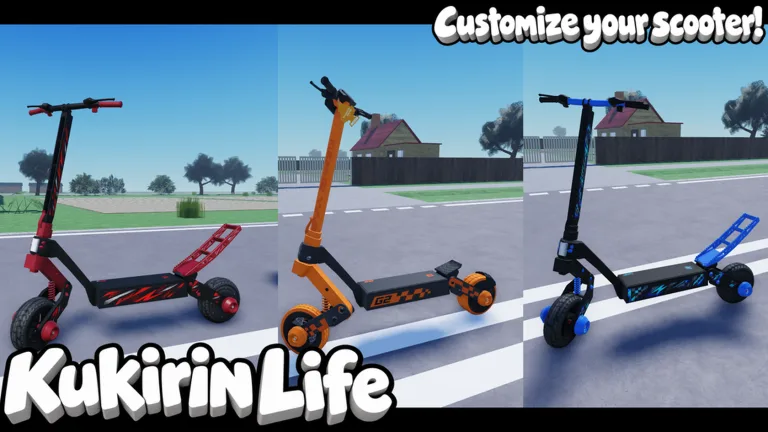 Image: Roblox / Mukbang Lovers
| Code | Listed reward | Use in your upgrade plan |
|---|---|---|
CR4TE | Basic Crate | Open it and inspect the actual reward |
TEST1NG | 750 Cash | Put the Cash toward a purchase you have checked |
The older gameplay guide says there were no codes yet. The newer October code listing supersedes that information, so use the redemption menu rather than assuming the feature is unavailable.
To redeem the listed codes:
- Join the Mukbang Lovers community.
- Launch Kukirin Life on Roblox.
- Open Menus on the left side of the screen.
- Select the gear icon, then the Codes tab.
- Enter a code in the Type here... box.
- Select Redeem to claim its reward.
Codes are case-sensitive. Copy them exactly, including the numbers in CR4TE and TEST1NG. Their listed status is tied to the dated update; availability can change.
Once you receive the rewards, look at what you actually gained before deciding what to buy. The gameplay guide shows a G4 obtained from a cash crate, but that example does not establish drop rates or promise the same outcome.
A good approach is to use the free crate before buying additional crates. Its result may affect your next decision, especially if you receive something relevant to the scooter or hardware options you were considering.
The 750 Cash reward also gives you a concrete amount to plan around. Compare it with current shop prices instead of assuming it covers a particular scooter, battery, or motor.
Use the tuning shop to inspect hardware and customization
The tuning shop is where Kukirin Life upgrades become more detailed. Bring your scooter to the shop and inspect the available customization and hardware menus.
The demonstrated options include scooter colors, screws, wheels, decals, lighting, a wheelie bar, batteries, and motors. Some rainbow customization requires Robux.
Check batteries and motors without guessing their effects
Batteries and motors are upgradeable hardware categories, and crates are connected to obtaining those upgrades. What is not established is the precise effect of each part.
For that reason, avoid assuming that every battery increases riding range or every motor adds a fixed amount of speed. Those would be useful distinctions, but they need actual item information.
A good approach is to:
- Check which battery and motor options are available.
- Read any displayed attributes before choosing a part.
- Review your crate rewards before spending on additional crates.
- Keep cosmetic purchases separate from your hardware budget.
If the interface does not explain a part’s effect, treat that as missing information. An impressive name or appearance is not enough to establish that one item is stronger than another.
Customize with a clear spending goal
Appearance options give you plenty to work toward even when you are happy with your scooter. You can change colors, adjust decals, and explore wheel or accessory customization.
The key decision is whether you want a different look now or would rather put your earnings toward another scooter or hardware option. Both are reasonable goals; they simply use your budget differently.
For performance-focused Kukirin Life upgrades, inspect scooters and hardware before paying for visual effects. For a customization-focused session, choose the specific feature you want and check its displayed cost.
A wheelie bar appears among the accessory options. Its presence does not establish an extra trick payout or handling benefit, so do not buy it expecting an undocumented advantage.
Earn upgrade money through tricks, quests, and events
Cash is the main currency for buying better rides. Tricks, challenges, quests, and map events provide activities to pursue while building your upgrade budget.
| Activity | Reward behavior described | Practical approach |
|---|---|---|
| Scooter tricks | Wheelies and other tricks earn Cash | Practice actions you can repeat while maintaining control |
| Challenges and quests | Objectives provide rewards | Check available objectives and claim completed rewards |
| Rideout events | Some events offer double Cash for tricks | Check the active event before relying on a bonus |
| Police chases | More police attention can increase earnings | Keep the chase manageable while learning to escape |
Practice repeatable tricks
Wheelies are a demonstrated way to earn Cash. The gameplay also shows V for no-hands riding and C for one-hand riding on keyboard.
Start with a trick you can control, then add other actions as you become comfortable. The guide connects more elaborate trick riding with higher earnings, but it does not provide a complete scoring formula.
That means there is no supported Cash-per-minute figure or guaranteed trick combination to recommend. For funding Kukirin Life upgrades, a sensible approach is to practice repeatable actions before attempting a more demanding routine.
Keep the purpose of the session clear. If you are trying to afford a purchase, watch your Cash balance and compare it with that item’s actual price. This gives your riding session a specific target without relying on invented earnings estimates.
Watch for rideouts and claim quest rewards
Events appear around the map, with orange circles used to mark activity locations. Rideout events can offer double Cash for tricks.
Check what the active event offers before assuming that riding at a particular location always doubles your earnings. The bonus is associated with events, rather than a permanent rule for every spot on the map.
Quests are another menu worth checking. Look at the available objectives and claim rewards for those you have completed.
A useful routine is to review quests, look for an active event, and then choose which activity to pursue. That connects your upgrade goal to the opportunities currently available instead of relying on a single farming method.
Treat police difficulty as a tradeoff
Wheelies near police and speeding can attract police attention. Wanted stars indicate an escalating chase, and increased police pressure is described as raising Cash rewards.
Higher police difficulty is also presented as a way to increase earnings, but it makes the pursuit more demanding. It should not be treated as an automatic improvement to every Cash session.
The demonstrated escape advice favors circles and diagonal movement over a long straight run, where police cars can catch up. Try turns and changes of direction while learning how the pursuit behaves.
A good approach is to raise difficulty only when you can manage the chase. The available information does not establish an exact payout multiplier for each difficulty setting or wanted level.
Choose your next purchase and review Robux options
Before spending, identify the result you want: another scooter, a hardware change, a crate reward, or a cosmetic feature. Kukirin Life upgrades become easier to plan when you compare purchases that serve the same goal.
For example, if you want a faster scooter, inspect the dealership and its current requirements. If you want a specific appearance, check that customization directly. If you choose a crate, remember that its contents are uncertain.
The official experience data lists these purchasable passes as of October 9, 2026:
| Game pass | Listed price |
|---|---|
| 2x Cash | 199 Robux |
| Rainbow Underglow | 39 Robux |
| Custom Paint | 49 Robux |
| Rainbow Smoke | 79 Robux |
| Rainbow Paint | 99 Robux |
The 2x Cash pass is advertised by that name, but the available details do not explain every reward category it covers. Check the purchase description before assuming it applies to all payouts.
The cosmetic passes offer a different spending goal. Choose them for the named customization rather than expecting an undocumented scooter-performance bonus.
Although the gameplay guide mentions Robux scooter purchases, the October 9 official pass data lists Kukirin G4 and Kukirin G4 Ultra as not for sale. Check the current dealership rather than relying on an older purchase route.
A practical spending order is to claim available freebies, inspect their rewards, compare current shop options, and then make the purchase that matches your goal. That keeps each decision grounded in what the game actually offers.
FAQ
What should I prioritize for Kukirin Life upgrades?
If your goal is a faster ride, inspect the dealership’s scooters and the tuning shop’s hardware options before buying cosmetics. Battery and motor effects need to be checked in-game; there is no supported universal upgrade order.
Can I get a G4 from a crate?
A G4 is obtained from a cash crate in the gameplay guide. That demonstrates a possible reward, but it does not establish its drop rate or guarantee that a Basic Crate will provide one.
Which codes provide upgrade rewards?
As of the October 9, 2026 code update, TEST1NG was listed for 750 Cash and CR4TE for a Basic Crate. Join Mukbang Lovers, then use Menus → gear icon → Codes to redeem them.
Do rainbow cosmetics make my scooter faster?
The available information does not establish a performance benefit for rainbow paint, smoke, or underglow. Treat them as appearance purchases and inspect scooter or hardware options separately when your goal is performance.
Continue with
 Kukirin Life cash: Fast Money, Codes, and Upgrade TipsEarn Kukirin Life cash with scooter tricks, rideout events, quests, and codes. Learn how to claim rewards and choose upgrades for your next ride in Roblox.
More in Guides
Kukirin Life discord: How to Join and Find New Codes
Find the Kukirin Life discord community, learn how to check invite links, and redeem Cash and Crate codes. Get practical tips for this Roblox scooter game.
Kukirin Life guide: Fast Cash, Scooters, and Upgrades
Use this Kukirin Life guide to earn Cash, redeem codes, upgrade scooters, and handle police chases. Build a better ride and explore Roblox with confidence.
Kukirin Life roblox Guide: Cash, Scooters, and Codes
Get ahead in Kukirin Life roblox with cash tips, scooter upgrades, police escape advice, and October codes. Learn where to spend and how to earn rewards.
Join the community
Official channels for news, updates and player help: