Kukirin Life scooters: Upgrades, Cash, and Speed Guide
Learn how to upgrade Kukirin Life scooters, earn cash with tricks and rideouts, customize your ride, and handle police chases in Roblox. Plan your ride.
Jump to
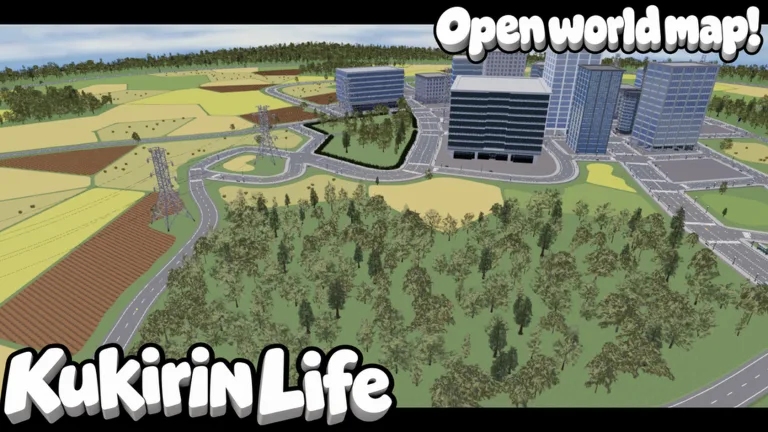
Get Started With Kukirin Life Scooters
Your free starter scooter gives you a way to start earning cash, practicing tricks, and exploring the city. Understanding Kukirin Life scooters matters because hardware upgrades, cosmetic purchases, and police chases all compete for your attention as you build your ride. With Kukirin Life scooters, a good approach is to learn the G2, practice cash-earning activities, and check what each purchase actually offers before spending.
Kukirin Life [Testing] on Roblox is a vehicle simulation experience built around electric scooters. Its official description highlights varied roads, customization, quests, and police pursuits. It is also a fan-made game with no affiliation with KuKirin.
The experience was updated on October 9, 2026, and remains labeled Testing. That matters when shopping: menus, availability, and the scooter lineup can change.
Know the scooter lineup
The available gameplay information identifies three models:
| Scooter | What is established | Availability detail |
|---|---|---|
| G2 | Free starter scooter | Available through your rides menu |
| G4 | Shown as faster than the starter scooter | Obtained from a cash crate during gameplay |
| G4 Ultra | Described as the fastest option | Its listed game pass was not for sale on October 9, 2026 |
There are no established numerical speed comparisons for these models. Avoid planning a purchase around a specific top speed unless you can see that figure in the current game.
The G4 also had a game pass listing marked not for sale on October 9. A listing does not guarantee that you can buy the scooter with Robux, and a demonstrated crate result does not guarantee your next reward.
A good opening routine is to spawn your G2, get comfortable steering, and locate the dealership and tuning shop. Those locations connect the main activities: browsing scooters, opening crates, and customizing your existing ride.
Earn Cash Through Tricks, Quests, and Rideouts
Cash gives you access to crate openings and the upgrades associated with them. The gameplay loop includes scooter tricks, challenges, quests, and events around the map.
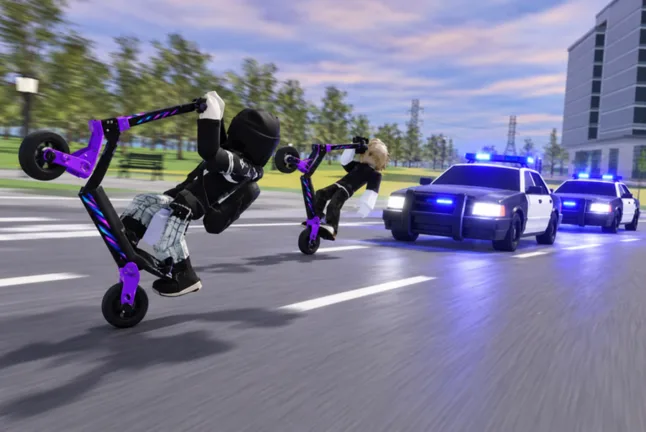 Image: Roblox / Mukbang Lovers
For Kukirin Life scooters, a useful early goal is consistency. Practice a trick you can control, watch for an active event, and check your quest menu rather than immediately taking on a difficult pursuit.
| Activity | Cash or reward opportunity | Practical approach |
|---|---|---|
| Wheelies | Earn cash while performing the trick | Practice the input before doing it near police |
| Other tricks | More elaborate tricks can increase earnings | Add difficulty as your control improves |
| Rideouts and events | Active events can offer increased trick rewards | Check the map for event markers |
| Quests and challenges | Provide objectives and rewards | Review requirements and claim completed quests |
| Police pursuits | Higher pursuit intensity may increase cash | Balance possible earnings against the chance of getting caught |
Look for active events
Events can appear during the in-game day, with a large orange circle indicating where to go. Rideout areas are worth checking because active events can offer double cash for tricks.
An event location and an active bonus are different things. Reaching a rideout spot does not establish that a special event is currently running. Check the map and any visible event information before treating the area as a bonus opportunity.
A good approach is to combine event participation with a trick you already understand. If wheelies are your most controlled move, practice them first, then use that familiarity when a rideout becomes available.
Keep quests in your routine
The quest menu gives you another set of goals alongside riding. Check it periodically and claim completed objectives through the available interface.
This is especially useful when deciding what to do next. An existing quest can give your session a clear purpose without requiring you to guess which activity pays the most.
There is no established cash-per-minute comparison between these activities. Treat any “fast money” route as situational: your scooter, trick control, event availability, and police pressure all affect how manageable it feels.
Upgrade Hardware and Understand Crate Rewards
The tuning shop lets you modify more than your scooter’s appearance. Batteries and motors are part of the hardware system, and crates can provide upgrades for those components.
A sensible approach to upgrading Kukirin Life scooters is to inspect hardware options before spending on decorative changes. That keeps your purchase decisions connected to riding and earning.
| Feature | Established function | Detail to check in-game |
|---|---|---|
| Battery | Hardware component with crate-based upgrades | The upgrade currently available for your scooter |
| Motor | Hardware component that can be upgraded | The effect shown in the tuning interface |
| Cash crates | Can provide scooter-related rewards | Current price and any displayed reward information |
| Dealership | Location for browsing scooter options | Which models and purchase methods are currently available |
The gameplay demonstration includes a cash crate that awards a G4. That establishes the G4 as a possible demonstrated reward, but it does not establish a guaranteed drop, a drop percentage, or a fixed number of openings needed.
Likewise, having 2,000 cash before opening a crate does not prove the crate costs exactly 2,000. Read the current purchase prompt instead of treating a player’s wallet balance as the price.
Make each purchase deliberate
Before opening a crate or changing hardware:
- Read the current cost.
- Check any reward details the interface displays.
- Inspect the upgrade or scooter you receive.
- Return to the tuning shop to review the relevant options.
The available information does not establish exact battery or motor bonuses. It also does not establish whether a particular component provides a specific acceleration increase, top-speed increase, or other measurable benefit.
That leaves an important distinction: hardware upgrades exist, but their precise effects need to be checked in-game. Avoid spending based on an assumed percentage or an undocumented performance promise.
If your goal is a faster scooter, compare the current dealership options with the crate interface. The G4 has a demonstrated crate acquisition, while the G4 Ultra’s purchase availability remains unclear from its inactive pass listing.
Customize Your Scooter and Check Robux Prices
Customization is a major part of Kukirin Life scooters. The tuning interface includes color changes, wheels, decals, accessories, and hardware. A wheelie bar is among the accessories shown.
You can use those options to build a recognizable look without assuming every visual change improves performance. Paint, glow, smoke, and decorative parts are presented as customization features; no speed bonus is established for them.
The following game passes were listed for sale on October 9, 2026:
| Game pass | Listed price | What the listing establishes |
|---|---|---|
| VIP | 249 Robux | A VIP pass; specific benefits are not detailed |
| Rainbow Underglow | 39 Robux | A rainbow underglow option |
| Rainbow Paint | 99 Robux | A rainbow paint option |
| Custom Paint | 49 Robux | A custom paint option |
| Rainbow Smoke | 79 Robux | A rainbow smoke option |
| 2x Cash | 199 Robux | A cash multiplier pass |
Prices and availability can change during testing. Check the purchase prompt before spending, particularly if you return after an update.
Separate appearance from earning goals
A good approach is to choose purchases according to what you want from the session. If you are building a themed scooter, inspect paint and accessory options. If you are focused on cash, review the 2x Cash pass’s current description and how it applies.
The pass name indicates a cash multiplier, but the available information does not explain which reward categories it covers or whether it stacks with event bonuses. Do not assume that a double-cash event and the pass automatically produce a particular combined multiplier.
VIP needs the same care. Its price is established, but its benefits are not detailed here. Read the current description before deciding whether it addresses anything you want.
Several other listings—including Rainbow Wheel and Rainbow Wheelie Bar—were marked not for sale. Their presence in the pass catalog should not be treated as current purchase access.
For a coordinated look, a simple editorial tip is to choose a color direction and preview matching parts. The tuning system offers enough visual categories to make that decision useful without requiring every available effect.
Handle Tricks and Police Chases With More Control
Police pursuits give Kukirin Life scooters an additional challenge. Performing wheelies near officers can provoke a chase, and speeding is also shown as a possible trigger. Wanted stars indicate escalating police attention.
Learning the controls before provoking officers is a practical way to make those encounters easier to manage.
| Input or indicator | Shown behavior | Practical note |
|---|---|---|
| Control + Up Arrow, with gradual W input | Used to perform a wheelie | Practice the timing away from police |
| V | No-hands riding | Check that you can maintain control |
| C | One-handed riding | Learn the behavior before adding pursuit pressure |
| Wanted stars | Show police attention | Watch for escalation while riding |
| Police difficulty setting | Allows difficulty changes | Inspect the setting before starting a chase |
These keyboard inputs come from the demonstrated gameplay. Check the current controls if they behave differently, particularly on another device.
Use turns to disrupt a pursuit
Driving straight away from police can be difficult because the police cars are shown catching up to the scooter. Circles, diagonal movement, and changes of direction are suggested escape techniques.
A good approach is to use turns deliberately while watching nearby vehicles. This is a control-based tactic, not a guaranteed escape method. The pursuit demonstration includes close calls and police vehicles making contact with the rider.
Higher wanted levels and harder police settings may offer greater cash opportunities, but the available information gives no reliable reward formula. There is also no established explanation of arrest penalties.
That makes escalating a chase a choice to evaluate, rather than an automatic money strategy. If officers are already making it hard to steer, adding difficulty may make the session less manageable.
For a balanced session, practice tricks, check for active rideouts, and inspect upgrades between pursuits. Kukirin Life scooters give you several activities to rotate through, so you can keep working toward your next purchase without making every ride a police chase.
FAQ
How do you get started with Kukirin Life scooters?
Open your rides menu and use the free G2 starter scooter. Practice steering and tricks, then locate the dealership and tuning shop. Wheelies, quests, challenges, and active events provide ways to work toward cash and rewards.
Can you get the G4 from a cash crate?
Yes. A cash crate is shown awarding a G4 during gameplay. That does not establish a guaranteed reward or drop rate. Check the current crate interface for its price and any available reward details.
Can you buy the G4 Ultra with Robux?
Its game pass listing was marked not for sale on October 9, 2026. Check the current dealership and purchase interface for availability. The existence of a pass listing alone does not mean the scooter is currently purchasable.
Do cosmetic upgrades make your scooter faster?
No performance bonus is established for paint, underglow, smoke, or decorative accessories. Batteries and motors belong to the hardware upgrade system. Inspect their current in-game descriptions when deciding how to improve your ride.
Continue with
 Kukirin Life customization: Paint, Effects & PricesExplore Kukirin Life customization with paint, rainbow effects, and current Robux prices. Compare available passes and plan your scooter's next look today.
Join the community
Official channels for news, updates and player help: