Kukirin Life discord: How to Join and Find New Codes
Find the Kukirin Life discord community, learn how to check invite links, and redeem Cash and Crate codes. Get practical tips for this Roblox scooter game.
Jump to
How to Find the Kukirin Life Discord Community
Looking for the Kukirin Life discord so you can catch code drops before your next scooter ride? The Kukirin Life discord community gives you somewhere to connect with other players and look for reward codes that could help fund your next upgrade. A verified invite link isn't available here, so begin with the game's Roblox page and check the destination before joining.
Open Kukirin Life [Testing] on Roblox and look for any community links the creator makes available. If you find a Discord invitation there, follow it and review the server information before participating. If no invitation appears, avoid treating a random search result as a confirmed developer link.
The experience belongs to Mukbang Lovers, a Roblox group. Its description credits fade & noel and identifies the game as a fan project with no affiliation with KuKirin. Those details help distinguish the Roblox experience from scooter brand communities or similarly named games.
| Detail to check | Kukirin Life information | How it helps |
|---|---|---|
| Roblox experience title | Kukirin Life [Testing] | Identifies the experience you want |
| Creator | Mukbang Lovers | Helps you check the Roblox creator identity |
| Place ID | 122840796290491 | Distinguishes the game from similarly titled experiences |
| Developer credits | fade & noel | Provides another detail to compare |
| Brand relationship | Fan-made; not associated with KuKirin | Separates the game from the scooter company's communities |
Matching names alone doesn't establish that a server belongs to the developers. A connection from the creator's Roblox presence is stronger evidence than a server title or copied promotional image.
Also watch for Drive A Kukirin, which is a separate title mentioned alongside Kukirin Life in code coverage. A guide or invitation for that game shouldn't be assumed to apply here.
What to Check Before Joining and Posting
Once you find a plausible Kukirin Life discord invitation, take a moment to understand where it leads. Your immediate goals are straightforward: identify the community, read its rules, and locate information relevant to the Roblox game.
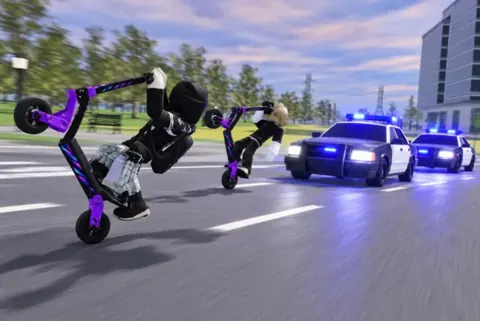
 Image: Roblox / Mukbang Lovers
Don't assume a specific channel layout. Channel names, verification requirements, and posting permissions aren't established here. If the server includes rules, announcements, or code channels, read their descriptions before sending a message. That helps you avoid dropping a reward question into an unrelated conversation.
For code hunting, a good approach is to search for the exact game title and the code you're checking. This can help separate a new reward announcement from someone reposting an older code. Pay attention to dates whenever they are available; a message saying a code worked earlier doesn't guarantee that it still works.
Keep the distinction between these communities clear:
- Mukbang Lovers on Roblox: The creator group you are instructed to join before redeeming codes.
- The Discord community: A place mentioned for connecting with players and finding new codes.
- The game itself: Where you enter codes and receive any valid rewards.
Joining Discord isn't listed as a redemption requirement. If you're only interested in the available freebies, focus on the Roblox group and the in-game redemption menu.
Treat links and account requests carefully. A community invitation shouldn't be a reason to share your Roblox password, account recovery information, or browser session details. If someone claims you need to provide those details to collect a code reward, use the game's redemption interface instead.
When asking for help, keep your message specific. Name the code, describe what happened, and mention whether you joined the creator group. That gives other players a clearer question to answer without exposing private account information.
Kukirin Life Codes and How to Redeem Them
One practical reason to visit the Kukirin Life discord is to look for new code releases. Codes can provide resources for your scooter journey, but they can expire, so always distinguish a dated code listing from a successful redemption in your current session.
The following rewards were listed as active in coverage updated October 9, 2026, which described their availability as of October 8, 2026.
| Code | Listed reward | Availability note |
|---|---|---|
CR4TE | Basic Crate | Listed as active in the October 9 update |
TEST1NG | 750 Cash | Listed as active in the October 9 update |
These are useful starting points, although their dated status isn't a guarantee that they remain redeemable whenever you play. Enter them exactly as shown: Kukirin Life codes are case-sensitive.
Follow the In-Game Redemption Steps
Join the Mukbang Lovers community on Roblox before trying to redeem either code. Then follow this menu path:
| Step | Action |
|---|---|
| 1 | Join the Mukbang Lovers Roblox community |
| 2 | Launch Kukirin Life on Roblox |
| 3 | Open Menus on the left side of the screen |
| 4 | Select the Gear icon, then open the Codes tab |
| 5 | Paste a code into the Type here... box |
| 6 | Select Redeem to attempt to claim its reward |
Copying the code directly is a good way to avoid mixing up letters and numbers. In particular, keep the numeral characters in CR4TE and TEST1NG intact.
If redemption fails, check the spelling and capitalization, then confirm that you've joined the required Roblox community. Expiration is another possible explanation. Don't assume that leaving and rejoining Discord will solve the problem, because Discord membership isn't part of the listed redemption steps.
The Basic Crate reward doesn't come with a verified contents list here. Avoid planning around a particular item or rarity unless the game provides that information. Likewise, the listed Cash reward is 750 Cash; don't expect an additional bonus without a separate announcement.
How Cash and Updates Fit Your Scooter Plans
Codes matter because Cash has a clear use in Kukirin Life: buying faster electric scooters from the shop. You can also earn Cash by driving around, giving you a gameplay route toward another ride alongside any valid promotional rewards.
A good approach is to inspect the scooters available in your current session before spending. Decide which ride you want, then use the shop's displayed information to guide your purchase. Exact scooter prices, performance comparisons, and a verified upgrade order aren't available here.
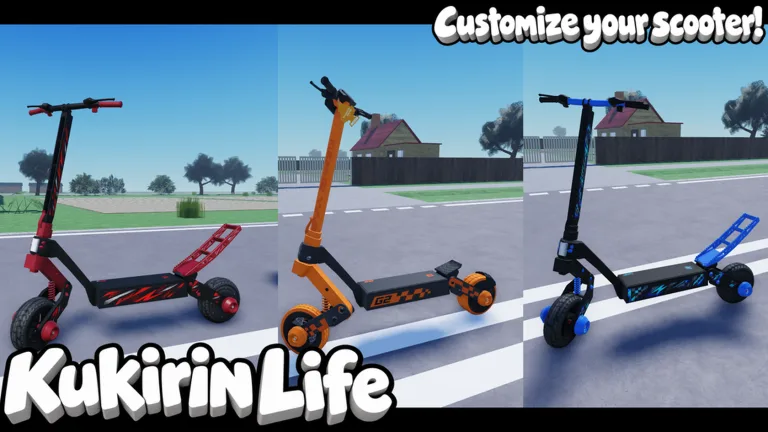
Kukirin Life also offers customization and police chases. Its official description mentions achievements and quests, while saying more scooters, points of interest, and other content are planned. Those features give you useful topics to look for when checking community discussions, without assuming that every suggestion represents an announced update.
The Roblox listing includes these purchasable game passes as of October 9, 2026:
| Game pass | Listed price |
|---|---|
| VIP | 249 Robux |
| Rainbow Underglow | 39 Robux |
| Rainbow Paint | 99 Robux |
| Custom Paint | 49 Robux |
| Rainbow Smoke | 79 Robux |
| 2x Cash | 199 Robux |
These are Robux purchases, so keep them separate from scooters bought with in-game Cash. Detailed benefits for VIP and the exact operation of 2x Cash aren't established here beyond their listing names. Check the current purchase description before deciding whether a pass suits your plans.
The [Testing] label is also relevant when reading the Kukirin Life discord. Menus, prices, and available content may change as development continues. The Roblox experience was last updated on October 9, 2026, but that date alone doesn't explain what changed.
Look for a specific announcement before treating a rumored scooter, feature, or release date as confirmed. A player suggestion can be interesting without being a development commitment.
Troubleshooting Invites, Codes, and Mixed-Up Information
A search for Kukirin Life discord can lead to several different problems: an expired invitation, an unrelated community, or a code post that has outlived its reward. Start by identifying which problem you're facing.
| Problem | What to check | Practical next step |
|---|---|---|
| A Discord invitation fails | Whether a current link is available through the creator's Roblox presence | Return to the game page and check available community links |
| A server has a similar name | Whether it connects to Kukirin Life and Mukbang Lovers | Verify that connection before relying on its announcements |
| A code doesn't redeem | Exact spelling, capitalization, group membership, and possible expiration | Correct entry mistakes and check for a newer announcement |
| Instructions mention another game | The experience title and creator | Use instructions specifically for Kukirin Life |
| Someone promises a particular crate item | Whether the game explains the crate's contents | Avoid assuming an unverified reward |
An invitation failure doesn't prove that the entire community has closed. The link itself may simply be unusable. If you can't locate a current invitation, you can still play the game and attempt the dated codes through its redemption menu.
Similarly, treat code reposts as leads rather than guarantees. A screenshot without context may omit the original posting date or the game it belongs to. Before trying a code, check that the post actually names Kukirin Life and describes a reward for this experience.
For update discussions, separate what is available now from what someone hopes will arrive. The developer description promises continued additions in general terms, but it doesn't provide a schedule for individual scooters or locations. Avoid spending Robux based solely on a player's prediction about future content.
Keep your community routine focused: check relevant announcements, copy any new code accurately, and verify its result inside the game. If you report a problem, explain the specific action that failed. Clear details are more useful than a broad claim that the game or server is broken.
FAQ
What is the Kukirin Life discord invite link?
A verified invitation URL isn't available here. Start with the Kukirin Life Roblox page and look for community links provided through the creator's presence. Check the connection to Mukbang Lovers before treating a Discord server as developer-associated; a matching server name alone isn't enough.
Do I need to join Discord to redeem Kukirin Life codes?
Discord membership isn't listed as a requirement. The redemption instructions tell you to join the Mukbang Lovers community on Roblox, launch Kukirin Life, and use Menus → Gear icon → Codes tab. Paste the code into the entry box and select Redeem.
Which Kukirin Life codes were listed for October 2026?
The October 9, 2026, code update listed CR4TE for a Basic Crate and TEST1NG for 750 Cash, describing them as active as of October 8. Codes can expire, so their listed status doesn't guarantee successful redemption later.
Is Kukirin Life associated with the KuKirin scooter company?
No. The game's official Roblox description identifies it as a fan-made KuKirin game and states that it isn't associated with KuKirin. The Roblox creator is Mukbang Lovers, and the description credits fade & noel. Keep that distinction in mind when looking for game communities or support.
Continue with
 Kukirin Life guide: Fast Cash, Scooters, and UpgradesUse this Kukirin Life guide to earn Cash, redeem codes, upgrade scooters, and handle police chases. Build a better ride and explore Roblox with confidence.
More in Guides
Kukirin Life cash: Fast Money, Codes, and Upgrade Tips
Earn Kukirin Life cash with scooter tricks, rideout events, quests, and codes. Learn how to claim rewards and choose upgrades for your next ride in Roblox.
Kukirin Life roblox Guide: Cash, Scooters, and Codes
Get ahead in Kukirin Life roblox with cash tips, scooter upgrades, police escape advice, and October codes. Learn where to spend and how to earn rewards.
Kukirin Life upgrades: Faster Scooters and Cash Tips
Plan your Kukirin Life upgrades with scooter, motor, and battery tips. Learn how to earn Cash, use crates, redeem codes, and prioritize your next purchase.
Join the community
Official channels for news, updates and player help: