Kukirin Life Achievements: Quests and Rewards Guide
Explore Kukirin Life achievements, quest rewards, daily bonuses, and scooter customization. Plan your next ride and keep track of rewards worth claiming.
Jump to
What Kukirin Life Achievements Mean for Your Next Ride
Your free scooter gives you a reason to start riding, but Kukirin Life achievements give you another reason to explore. Between quests, daily rewards, and customization, checking your menus matters because completed tasks can leave rewards ready to collect. Start your Kukirin Life achievements routine by reviewing your current objectives, then take your scooter out onto the roads.
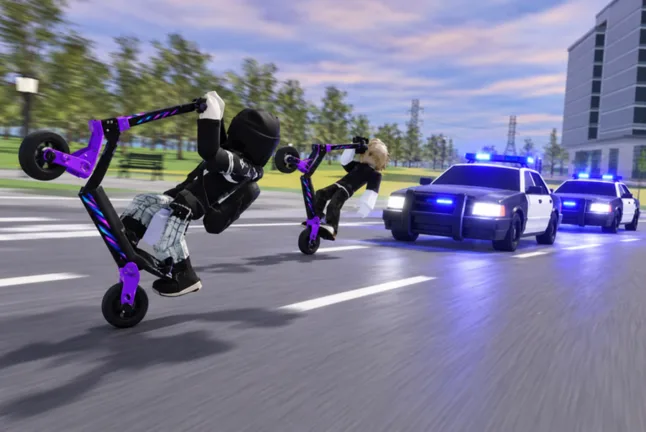
Kukirin Life [Testing] is a Roblox vehicle simulator built around electric scooters, a large map, customization, and police chases. Achievements and quests are part of that experience, alongside the freedom to cruise with friends and decorate your ride.
The useful distinction is between an achievement, a quest reward, and a daily bonus. Keep those separate when deciding what to check during a session. A reward you collect from a completed quest belongs to that quest; your daily reward is another menu item to claim.
| Feature | What It Offers | What to Check |
|---|---|---|
| Achievements | An advertised feature of Kukirin Life [Testing] | The current in-game achievement information |
| Quests | Tasks with rewards available after completion | Your objective text and completed entries |
| Daily rewards | A separate reward claim | The daily reward menu |
| Scooter customization | Color changes, accessories, and hardware options | The tuning menu and each option’s cost |
Kukirin Life achievements also deserve a different kind of attention than Roblox profile badges. On October 9, 2026, the experience had no Roblox badges listed. The game still advertised achievements as part of its features.
Open Kukirin Life on Roblox to play, then use the information inside the game to choose your next objective.
Check Quests and Collect Rewards Before Spending
Before shopping for another scooter, look through your reward menus. In the October 2026 testing version, completed quests could be claimed during a session, and a daily reward was available separately. That makes a quick menu check useful even when you mostly want to ride around.
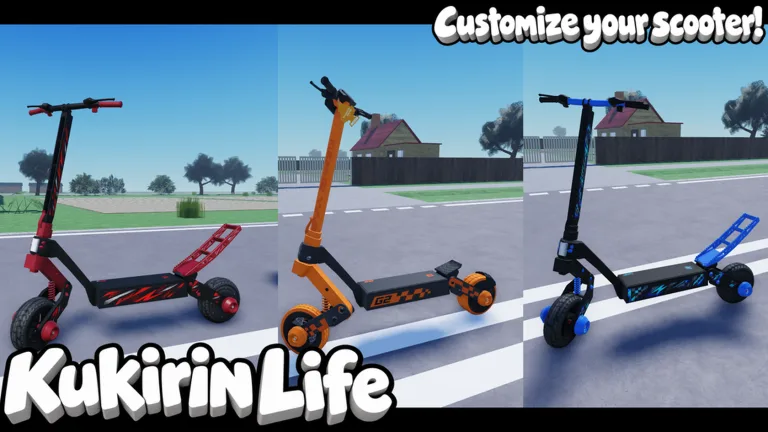 Image: Roblox / Mukbang Lovers
A free wearable helmet was also available during reward collection. Equip it if you want to add something to your rider’s appearance alongside your scooter’s paint and accessories. Keep the helmet separate from your scooter upgrades when planning your look: one changes your character’s outfit, while the other changes the vehicle.
Use this checklist to organize a session without turning every ride into a shopping trip:
| Step | Action | Detail to Review |
|---|---|---|
| Review objectives | Read the current quest entries | The activity and any duration written in the menu |
| Collect completed rewards | Claim entries marked complete | The reward attached to that entry |
| Check daily rewards | Open the daily reward menu | The reward available to claim |
| Review your cash | Look at your balance before buying | The purchase price shown in the shop |
| Return to riding | Take out your scooter | The objective you want to work on next |
Quest entries in the October testing version included time-based text, with one-minute and five-minute references appearing in the menu. Police mode also appeared among the quest text. Read the full current entry before choosing an activity, especially when a timer or mode is involved.
For Kukirin Life achievements, keep the same habit: read the objective before trying to complete it. Use the wording in the game to guide your session instead of assuming that every activity shares the same requirement.
If you have several completed entries, collect them before browsing the dealer. Then compare your balance against the scooter or item you actually want. That gives you a concrete spending decision instead of a vague urge to buy whatever catches your eye.
Daily rewards are easy to overlook when you head straight onto the map. Add that menu check to your routine, then get back to exploring. You can still keep a session relaxed while remembering to collect what is already available.
Use the Free Scooter to Explore Your Options
New players receive a free starter scooter, called an “Autopad” in the gameplay menus. Take it out and explore before deciding whether another model deserves your cash.
The October testing version included scooter price points of 2,000, 2,500, 5,000, and 10,000 in-game money. A scooter available through Robux was also present. Those purchases sit alongside the free starter ride, giving you several things to compare before spending.
Check the actual model and price together. Keep the amount you need in mind while collecting rewards, and avoid choosing a purchase solely because its price fits your current balance. Look at the scooter itself and decide whether it is the one you want to ride.
Kukirin Life achievements can share your attention with ordinary exploration. The map has varied roads, and police chases are part of the game’s advertised features. Use your time on the starter scooter to explore those roads and inspect the menus that interest you.
Police vehicles and a police car rental area were present in the October testing version. If your current quest mentions police mode, read that entry before pursuing it. Match your activity to the objective’s wording instead of relying on the presence of a police car nearby.
Keep your next session focused with a short personal checklist:
- Read the objective you want to pursue.
- Collect any completed quest rewards.
- Check your daily reward.
- Ride the scooter you already own.
- Review prices before buying another model.
This keeps the practical parts of Kukirin Life achievements close to the gameplay. You have a task to check, rewards to collect, and a scooter ready to use without needing to purchase something at every stop.
Customize Your Ride Without Losing Track of Your Budget
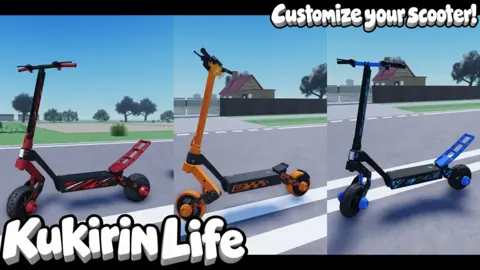
Tuning is a substantial part of Kukirin Life. You can enter the tuning interface through the dealer, then work through colors, accessories, and other scooter options.
The October testing version allowed changes to front and rear rim colors, along with other visible parts. Accessories included suspension options, bull bars, and protective guards. Hardware and software appeared as separate categories, with a software option requiring Robux.
| Customization Area | Options Present in the Testing Version | What to Review |
|---|---|---|
| Wheels and rims | Color changes for front and rear components | Each selected part and its color |
| Accessories | Suspension, bull bars, and guards | The accessory’s appearance |
| Protective parts | Guard and case color changes | How the colors fit the rest of the scooter |
| Hardware | A separate tuning category | The item and any displayed price |
| Software | A Robux purchase option | The Robux cost before purchasing |
Start with a color combination you want to use across the scooter. Change the front and rear rims, then inspect the guards and accessories. For example, blue rims and a red accent were possible color choices in the October testing version. Choose the combination you like rather than feeling obligated to change every visible part.
Free color customization was available on the starter scooter during that version. Try those options before spending on premium cosmetics, especially if your main goal is to make the free ride look more personal.
Separate visual choices from your Kukirin Life achievements checklist. Paint, decorative effects, and accessories give you customization decisions of their own. Read the achievement or quest text when you want to pursue an objective, and use the tuning menu when you want to change your ride’s appearance.
The game also sold several passes with different prices:
| Game Pass | Price on October 9, 2026 |
|---|---|
| VIP | 249 Robux |
| Rainbow Underglow | 39 Robux |
| Rainbow Paint | 99 Robux |
| Custom Paint | 49 Robux |
| Rainbow Smoke | 79 Robux |
| 2x Cash | 199 Robux |
Review the current purchase screen before buying. Pick a cosmetic because you want that effect, and examine the details of other passes before committing your Robux. Keep your in-game money budget and Robux budget separate so you can compare each purchase clearly.
Keep Achievements, Codes, and Crates Organized
Kukirin Life achievements sit alongside several other features competing for your attention. Codes, crates, daily rewards, quests, and the dealer all appeared in the October testing version.
Code redemption required joining the Roblox group before a code could be successfully entered. Cash and items were available through redemption, including wheels and battery-related items. Some code rewards involved a spinning item selection.
Check the group requirement if you use the redemption menu. Then review the reward you receive before returning to tuning or shopping. Keep code rewards separate from completed objectives when tracking what you have collected.
Some October promotional codes had an October 12 expiration date. Use the current redemption menu to check a code you already have, and keep an eye on its stated expiration. Time-limited promotions deserve attention, but the regular quest and daily reward menus remain useful parts of your session.
A basic crate purchase was also available. Check its displayed price against your balance before opening one, particularly if you are saving for a specific scooter.
For Kukirin Life achievements, organize your priorities around the objective currently in front of you:
- Claim rewards attached to completed quests.
- Collect the available daily reward.
- Read the next objective’s full requirements.
- Compare scooter prices before spending cash.
- Check tuning options when you want a visual change.
The experience still carried the [Testing] label in October 2026 and was receiving updates. Revisit the menus when you return so your next ride follows the objectives and options currently on screen.
FAQ
How do I start working on Kukirin Life achievements?
Open the game and review its achievement and quest information. Read the current objective, collect completed quest rewards, and use your free starter scooter to begin exploring.
Does Kukirin Life have Roblox badges?
No Roblox badges were listed for the experience on October 9, 2026. Achievements and quests were advertised features of Kukirin Life [Testing].
Can I customize the free starter scooter?
Yes. The October testing version allowed free color customization on the starter scooter, including changes to rims and other visible parts. The tuning interface also included accessories and separate hardware and software categories.
What should I check before buying another scooter?
Collect completed quest rewards and your available daily reward, then review your cash balance. Compare it with the model’s displayed price; October testing prices included 2,000, 2,500, 5,000, and 10,000 in-game money.
Continue with
 Kukirin Life Driving System: Features and Riding TipsExplore the Kukirin Life driving system, varied roads, police chases, and scooter customization. Plan your ride in this Roblox vehicle simulation game.
More in Features
Kukirin Life 2x Cash: Price, Rewards, and Buying Tips
Kukirin Life 2x Cash costs 199 Robux. Compare cash rewards, scooter upgrades, and other passes, then decide how to spend your Robux before your next ride.
Kukirin Life Police Chases: Features and Riding Tips
Explore Kukirin Life police chases, scooter customization, varied roads, and current game passes. Get practical riding tips for this Roblox vehicle sim.
Kukirin Life Quests: Rewards and Getting Started Guide
Learn how Kukirin Life quests fit into your scooter rides, claim completed rewards, check daily rewards, and plan your next purchase in the Roblox game.
Kukirin Life VIP: Price, Pass Options, and Buying Tips
Kukirin Life VIP costs 249 Robux. Compare its price with cash and customization passes, check purchase options, and plan your spending before your ride.
Join the community
Official channels for news, updates and player help: